
DNS Security Best Practices: Protect Your Domain
Review registrar access, DNS change controls and DNSSEC validation, and distinguish DNS integrity from encrypted transport.
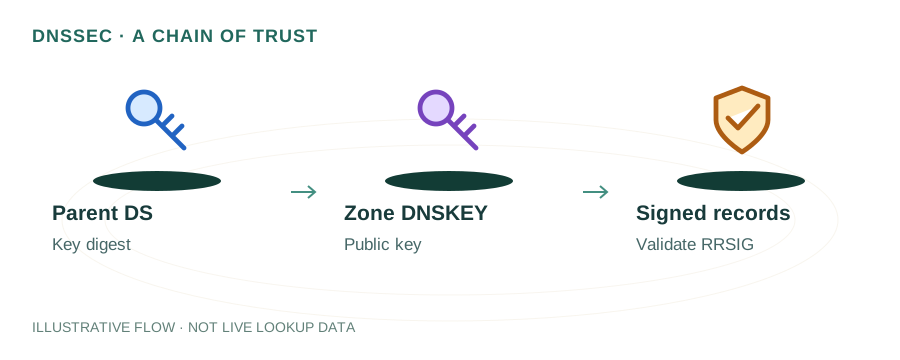
The named scenario below is a worked example for learning, not a verified incident report. Provider settings and outcomes vary.
DNS Security Layers
Sign DNS responses
Control SSL issuance
Prevent hijacking
Alert on changes
Review all records
Domain fully secured
🎯 Illustrative example: Ankur's Domain Gets Hijacked
Ankur wakes up to find his domain pointing to a phishing page. Someone changed his DNS records. Here's how to prevent it:
Users report phishing page on ankur.com
His website shows a fake login page stealing credentials. Someone changed his A record.
Investigation: Registrar account compromised
Attacker used credential stuffing to access his registrar account. No 2FA was enabled.
Step 1: Enable registrar lock
Domain transfer lock (clientTransferProhibited) prevents unauthorized domain transfers.
Step 2: Enable 2FA everywhere
2FA on registrar, DNS hosting, and email accounts. Hardware key preferred.
Step 3: Deploy DNSSEC
DNSSEC signs DNS responses cryptographically. Forged/modified responses are detected and rejected.
Step 4: Set up DNS monitoring
Monitors A, MX, NS records for unauthorized changes. Alerts via SMS/email within minutes.
Multi-layer security: registrar lock + 2FA + DNSSEC + monitoring = nearly impossible to hijack.
Without these protections, a single compromised password can give attackers full domain control.
Common DNS Attack Vectors
DNS Cache Poisoning
Attackers inject forged DNS responses into a resolver's cache, redirecting users to malicious servers.
DNS Hijacking
Unauthorized changes to DNS records or nameserver settings — often through compromised registrar accounts.
DDoS Attacks on DNS
Flooding DNS servers with queries to make a domain unreachable (e.g., the 2016 Dyn attack).
Domain Takeover
Dangling DNS records (e.g., CNAME pointing to a deprovisioned cloud resource) allow attackers to claim the subdomain.
Unauthorized Certificate Issuance
Without CAA records, any CA can issue certificates for your domain if they can complete domain validation.
1. Enable DNSSEC
DNSSEC adds cryptographic signatures to DNS records, allowing resolvers to verify that responses are authentic and unmodified.
- Protects against cache poisoning and man-in-the-middle attacks
- Enable at your DNS provider, then add DS records at your registrar
- Many providers (Cloudflare, Route 53, Google Cloud DNS) support one-click DNSSEC
Learn more: DNSSEC Explained
2. Set Up CAA Records
CAA records restrict which Certificate Authorities can issue SSL/TLS certificates for your domain:
example.com.  CAA  0 issue "letsencrypt.org"
example.com.  CAA  0 iodef "mailto:security@example.com"
Full guide: CAA Record Explained
3. Secure Your Registrar Account
- Enable 2FA — Use hardware keys (YubiKey) or TOTP apps, not SMS
- Enable registrar lock — Set
clientTransferProhibitedstatus - Use a strong, unique password for your registrar account
- Keep contact info current — ICANN uses it for transfer approvals
4. Use DNS over HTTPS/TLS
Encrypt DNS queries to prevent eavesdropping and tampering between clients and resolvers:
- • DoH (DNS over HTTPS) — Encrypts queries over HTTPS on port 443
- • DoT (DNS over TLS) — Encrypts queries over TLS on port 853
Learn more: DNS over HTTPS Explained
5. Prevent Subdomain Takeover
Audit your DNS records regularly for dangling entries:
- CNAME records pointing to deprovisioned services (Heroku, AWS, Azure, GitHub Pages)
- A records pointing to released IP addresses
- Remove DNS records when decommissioning services
- Regularly audit all subdomains and their targets
6. Email Authentication (SPF, DKIM, DMARC)
Prevent domain spoofing in email with the authentication trifecta:
; SPF — authorize sending servers
example.com.  TXT  "v=spf1 include:_spf.google.com -all"

; DKIM — sign outgoing emails
google._domainkey.example.com.  TXT  "v=DKIM1; k=rsa; p=..."

; DMARC — enforce policy and get reports
_dmarc.example.com.  TXT  "v=DMARC1; p=reject; rua=mailto:dmarc@example.com"
Complete comparison: SPF vs DKIM vs DMARC
7. DNS Redundancy & DDoS Protection
- Use multiple nameservers in different networks/geographies
- Consider secondary DNS with a different provider for resilience
- Use anycast DNS providers (Cloudflare, AWS Route 53, Google Cloud DNS)
- Set up DNS failover for critical services
Security Checklist
- DNSSEC enabled
- CAA records configured
- Registrar 2FA + domain lock enabled
- SPF + DKIM + DMARC (p=reject) deployed
- No dangling CNAME or A records
- Multiple geographically distributed nameservers
- DNS monitoring / alerting configured
- Certificate Transparency monitoring active
Frequently Asked Questions
What are the biggest DNS security threats?
Cache poisoning, DNS hijacking, DDoS attacks, domain takeover via dangling records, and unauthorized certificate issuance.
What is DNSSEC and should I enable it?
DNSSEC adds cryptographic signatures to DNS responses. Yes, enable it — it protects against cache poisoning and MITM attacks on DNS.
How do I protect my domain from being hijacked?
Enable registrar lock, use 2FA on registrar and DNS accounts, enable DNSSEC, set CAA records, and monitor DNS for unauthorized changes.