
DNSSEC Explained: What It Is & How to Enable It
Follow the DNSSEC trust chain from DS to DNSKEY and signatures, and understand why validation can fail.
What Is DNSSEC?
DNSSEC — DNS Security Extensions — is a suite of IETF specifications (RFC 4033–4035) that add origin authentication and data integrity to the Domain Name System. In plain language, DNSSEC lets a DNS resolver verify that the answer it received actually came from the authoritative name server and was not altered in transit.
Without DNSSEC, DNS is vulnerable to cache-poisoning attacks (also called DNS spoofing). An attacker who can inject forged responses into a resolver's cache can redirect users to phishing sites, intercept email, or hijack entire domains — all without the victim seeing any browser warning. DNSSEC eliminates this class of attack by making every DNS response cryptographically verifiable.
It is important to understand what DNSSEC does not do: it does not encrypt DNS traffic. Queries and responses are still sent in plaintext. For confidentiality you need DNS-over-HTTPS (DoH) or DNS-over-TLS (DoT). DNSSEC and encrypted transport are complementary — you should ideally use both.
How DNSSEC Works: The Chain of Trust
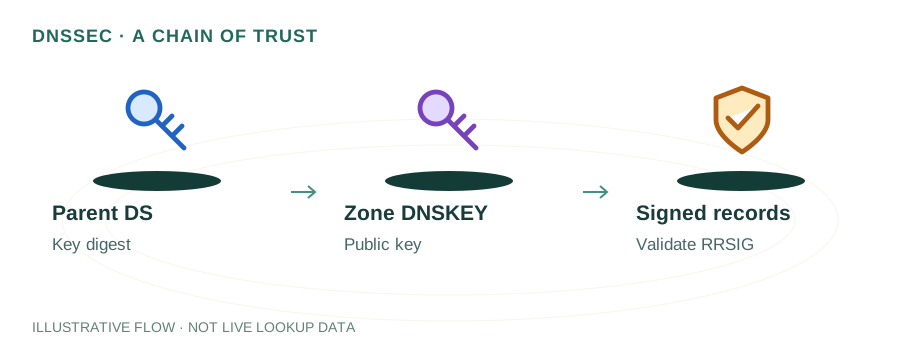
DNSSEC relies on a hierarchical chain of trust that mirrors the DNS delegation hierarchy. At the top is the DNS root zone, which is signed by ICANN. Each parent zone vouches for its child zones using a specific record type called the DS (Delegation Signer) record.
Here is a simplified overview of the process:
- The zone administrator generates two key pairs: a Zone Signing Key (ZSK) used to sign individual record sets, and a Key Signing Key (KSK) used to sign the DNSKEY record set itself.
- Every DNS record set (e.g., all A records for a name) is signed with the ZSK, producing an RRSIG record that accompanies the answer.
- The public halves of both keys are published as DNSKEY records in the zone.
- A hash of the KSK is sent to the parent zone, which publishes it as a DS record. This links the child zone's keys to the parent's trust.
- A validating resolver walks the chain from the root's trust anchor → root DNSKEY → .com DS → .com DNSKEY → example.com DS → example.com DNSKEY → RRSIG on the answer. If every signature checks out, the response is authenticated.
If any link in the chain is broken — a missing DS record, an expired RRSIG, or a key mismatch — the resolver returns SERVFAIL instead of the answer, protecting the end user from potentially forged data.
DNSSEC Record Types at a Glance
RRSIG
Contains the cryptographic signature for a record set. Each DNS record type in a signed zone has a corresponding RRSIG. It includes the signer's name, algorithm, expiration time, and the signature itself.
DNSKEY
Holds the public key used to verify RRSIG signatures. A zone typically publishes two DNSKEYs: one for the KSK (flag 257) and one for the ZSK (flag 256).
DS
A hash of the child zone's KSK, published in the parent zone. This is the trust anchor that links a child zone to its parent and enables chain-of-trust validation.
NSEC / NSEC3
Provides authenticated denial of existence. If a queried name does not exist, the NSEC or NSEC3 record proves it, preventing attackers from spoofing NXDOMAIN responses. NSEC3 adds hashing to prevent zone-walking enumeration.
How to Enable DNSSEC
Enabling DNSSEC involves two parties: your DNS hosting provider (who signs the zone) and your domain registrar (who publishes the DS record in the parent zone). Some providers like Cloudflare handle both steps with a single toggle.
Step-by-Step Process
- Sign your zone. In your DNS provider's dashboard, enable DNSSEC zone signing. The provider generates the ZSK and KSK and begins signing all record sets. Providers like Cloudflare, AWS Route 53, Google Cloud DNS, and many others support this natively.
- Obtain the DS record. Your DNS provider will display the DS record details: Key Tag, Algorithm, Digest Type, and Digest value.
- Add the DS record at your registrar. Log into your domain registrar (e.g., Namecheap, GoDaddy, Google Domains) and add the DS record to the domain's DNSSEC settings. This step publishes the trust link in the parent (.com, .net, etc.) zone.
- Wait for propagation. DS cache lifetimes and provider updates determine when a changed delegation is observed. During this period, some resolvers may not yet validate your zone.
- Verify. Use the tools in the next section to confirm that the chain of trust is intact.
Warning: If you switch DNS providers after enabling DNSSEC, you must update or remove the DS record at your registrar before the old provider stops serving the signed zone. A stale DS record pointing to keys that no longer exist will cause total resolution failure for validating resolvers.
How to Verify DNSSEC Is Working
After enabling DNSSEC, run these checks to confirm everything is configured correctly:
- mydnsreport.com DNS Lookup: Use the DNS Lookup Tool to query your domain. If DNSSEC is active, you will see DNSKEY and DS records in the results.
- Command-line dig: Run
dig +dnssec +short example.com A. If DNSSEC is working, the response includes thead(Authenticated Data) flag in the header. - DNSViz (dnsviz.net): Provides a visual graph of the entire chain of trust from root to your domain. Broken links appear in red.
- Verisign DNSSEC Debugger: A quick online tool that walks the delegation chain and reports any misconfigurations.
- Google Public DNS: Query your domain using
dig @8.8.8.8 +dnssec example.com. Google's resolver performs full DNSSEC validation, so if it returns results with the AD flag, your setup is correct.
Common DNSSEC Pitfalls
- Expired RRSIG signatures: RRSIG records have an expiration date. If your DNS provider fails to re-sign the zone before signatures expire, validating resolvers will reject responses. Most managed providers handle this automatically, but self-hosted BIND or PowerDNS setups require scheduled re-signing.
- DS/DNSKEY mismatch: If you rotate your KSK but forget to update the DS record at the registrar, the chain of trust breaks. Always perform key rollovers following RFC 7583 best practices: publish the new key first, update the DS, then remove the old key.
- Stale DS after provider migration: Switching from one DNS host to another without removing the old DS record is the most common cause of DNSSEC-related outages.
- Firewall blocking large responses: Signed DNS responses are larger than unsigned ones. Firewalls or middleware that truncate UDP packets above 512 bytes can break DNSSEC. Ensure your network supports EDNS0 and allows DNS responses up to 4096 bytes.
Frequently Asked Questions
What is DNSSEC and why does it matter?
DNSSEC (DNS Security Extensions) adds cryptographic signatures to DNS records so resolvers can verify that responses have not been tampered with. Without DNSSEC, attackers can perform cache-poisoning or man-in-the-middle attacks, redirecting users to malicious servers without their knowledge.
Does DNSSEC encrypt my DNS queries?
No. DNSSEC provides authentication and integrity — it proves that a DNS response is genuine and unmodified — but it does not encrypt the query or response. For encrypted DNS transport, you need DNS-over-HTTPS (DoH) or DNS-over-TLS (DoT), which can be used alongside DNSSEC.
How do I check if a domain has DNSSEC enabled?
You can use the mydnsreport.com DNS Lookup tool to check for DNSKEY and DS records. You can also run 'dig +dnssec example.com' from a terminal. Online validators like DNSViz or Verisign DNSSEC Debugger provide visual chain-of-trust analysis.
Can DNSSEC break my website?
Misconfigured DNSSEC can cause resolution failures. If the DS record at the parent zone does not match the DNSKEY at the child zone, validating resolvers will return SERVFAIL. Always test thoroughly after enabling DNSSEC, and ensure you update DS records whenever you rotate keys.