
SSL/TLS for Beginners: HTTPS, Certificates & DNS
Understand certificates, HTTPS and the TLS handshake, and separate certificate problems from DNS resolution errors.
What is SSL/TLS?
TLS (Transport Layer Security) is the protocol that encrypts communication between a web browser and a web server. When you see the padlock icon in your browser's address bar and the URL starts with https://, TLS is active.
SSL (Secure Sockets Layer) was the original protocol, but it's been deprecated since 2015 due to security vulnerabilities. Modern connections use TLS 1.2 or TLS 1.3. The industry still says "SSL certificate" as a legacy term, but the actual protocol is always TLS.
TLS provides three critical security properties:
Encryption
Data exchanged between browser and server is encrypted, preventing eavesdropping on public WiFi or by ISPs.
Authentication
The certificate proves the server's identity. Visitors know they're talking to the real server, not an impersonator.
Integrity
TLS ensures data hasn't been tampered with in transit. Any modification is detected and the connection is rejected.
How HTTPS Works (The TLS Handshake)
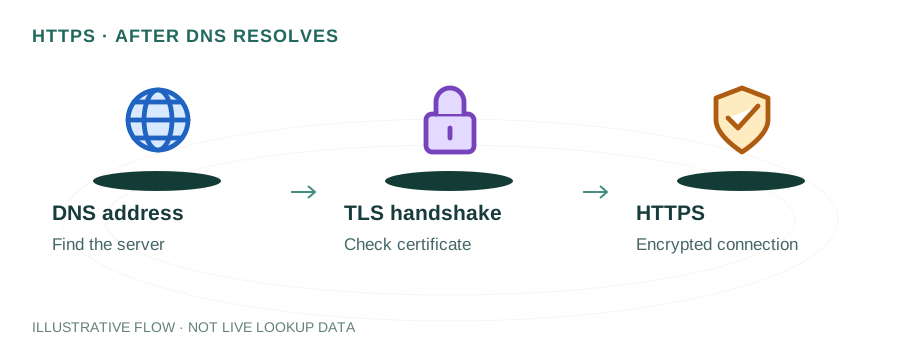
When your browser connects to an HTTPS site, a TLS handshake occurs in milliseconds:
- Client Hello: Your browser sends a list of supported TLS versions and cipher suites to the server.
- Server Hello: The server picks a TLS version and cipher suite, and sends its SSL certificate.
- Certificate Verification: Your browser checks that the certificate is valid, not expired, and issued by a trusted Certificate Authority (CA).
- Key Exchange: Browser and server establish a shared encryption key using asymmetric cryptography (RSA or ECDHE).
- Encrypted Session: All subsequent data is encrypted with the shared key using symmetric encryption (AES).
With TLS 1.3, this handshake is reduced to a single round trip, making HTTPS connections nearly as fast as HTTP.
Types of SSL/TLS Certificates
| Type | Validation | Best For | Cost |
|---|---|---|---|
| DV | Domain Validation | Blogs, personal sites | Free – $50/yr |
| OV | Organization Validation | Business websites | $50 – $200/yr |
| EV | Extended Validation | Banks, e-commerce | $100 – $500/yr |
| Wildcard | DV or OV | Multiple subdomains | $50 – $300/yr |
For most websites, a free DV certificate from Let's Encrypt is sufficient. EV certificates no longer display the company name in modern browsers, reducing their visual benefit.
Free SSL with Let's Encrypt
Let's Encrypt is a free, automated Certificate Authority that issues DV certificates. It's the most widely used CA in the world, securing over 300 million domains.
# Install Certbot and get a certificate
$ sudo apt install certbot python3-certbot-nginx
$ sudo certbot --nginx -d example.com -d www.example.com
# Auto-renewal is set up automatically via systemd timer
$ sudo certbot renew --dry-run
Let's Encrypt certificates are valid for 90 days and auto-renew. Two validation methods are supported:
- HTTP-01: Certbot places a file on your web server that Let's Encrypt verifies. Requires port 80 to be open.
- DNS-01: A TXT record is added to your DNS zone. This is the only method that works for wildcard certificates and doesn't require a running web server.
CAA DNS Records: Controlling Certificate Issuance
A CAA (Certificate Authority Authorization) record is a DNS record that specifies which CAs are allowed to issue SSL certificates for your domain. This is a powerful security measure that prevents unauthorized certificate issuance.
# Only allow Let's Encrypt to issue certificates
example.com. CAA 0 issue "letsencrypt.org"
example.com. CAA 0 issuewild "letsencrypt.org"
example.com. CAA 0 iodef "mailto:admin@example.com"
The iodef tag tells CAs to email you if someone tries to get a certificate from an unauthorized CA. Check your domain's CAA records with our DNS Lookup tool.
Common SSL/TLS Errors
ERR_CERT_DATE_INVALID
The certificate has expired. Renew it immediately. If using Let's Encrypt, check that the auto-renewal cron/systemd timer is running.
ERR_CERT_COMMON_NAME_INVALID
The certificate doesn't cover the domain being accessed. Common when accessing www.example.com but the cert only covers example.com (or vice versa).
Mixed Content Warnings
The page loads over HTTPS but includes HTTP resources (images, scripts). Update all internal URLs to use HTTPS or protocol-relative URLs.
ERR_SSL_PROTOCOL_ERROR
Usually caused by TLS version incompatibility. Ensure your server supports TLS 1.2+ and has disabled SSL 3.0 and TLS 1.0/1.1.
SSL/TLS Best Practices
- Use TLS 1.3 wherever possible — it's faster and more secure than TLS 1.2.
- Enable HSTS (HTTP Strict Transport Security) to force browsers to always use HTTPS.
- Set up CAA records to restrict which CAs can issue certificates for your domain.
- Redirect HTTP to HTTPS at the server level (301 redirect).
- Monitor certificate expiry and set up alerts for renewals.
- Use OCSP stapling to speed up certificate validation for visitors.
Frequently Asked Questions
What is the difference between SSL and TLS?
SSL (Secure Sockets Layer) is the predecessor to TLS (Transport Layer Security). SSL is now deprecated and insecure — all modern "SSL certificates" actually use TLS 1.2 or TLS 1.3. The term "SSL" persists as a marketing name, but the actual protocol is TLS.
How do I get a free SSL certificate?
Let's Encrypt is the most popular free SSL/TLS certificate authority. You can use tools like Certbot to automatically obtain and renew certificates. Many hosting providers (Cloudflare, Netlify, Vercel) also provide free SSL automatically.
What is a CAA DNS record?
A CAA (Certificate Authority Authorization) record is a DNS record that specifies which certificate authorities are allowed to issue SSL certificates for your domain. For example, setting "example.com CAA 0 issue letsencrypt.org" means only Let's Encrypt can issue certificates for your domain.