
How to Secure Your Domain: Complete Security Checklist
Review registrar access, domain locks, DNS settings and renewal safeguards to reduce avoidable domain risks.
Why Domain Security Matters
Your domain is the foundation of your online identity. A compromised domain can lead to website defacement, email interception, phishing attacks against your customers, and devastating SEO damage. Domain hijacking — where an attacker gains control of your domain — can take weeks or months to recover from.
This guide provides a layered security approach: from registrar-level protections through DNS hardening to email authentication and certificate management.
Registrar-Level Security
Enable Registrar Lock
Set the clientTransferProhibited status to prevent unauthorized transfers. Most registrars enable this by default.
Enable Two-Factor Authentication
Protect your registrar account with TOTP-based 2FA. SMS-based 2FA is better than nothing but vulnerable to SIM-swapping.
Use WHOIS Privacy
Enable WHOIS privacy protection to hide your personal contact details from public WHOIS queries and reduce social engineering risk.
Set Up Auto-Renewal
Domains that expire can be immediately registered by domain squatters. Enable auto-renewal and keep payment methods up to date.
DNS Security
Enable DNSSEC
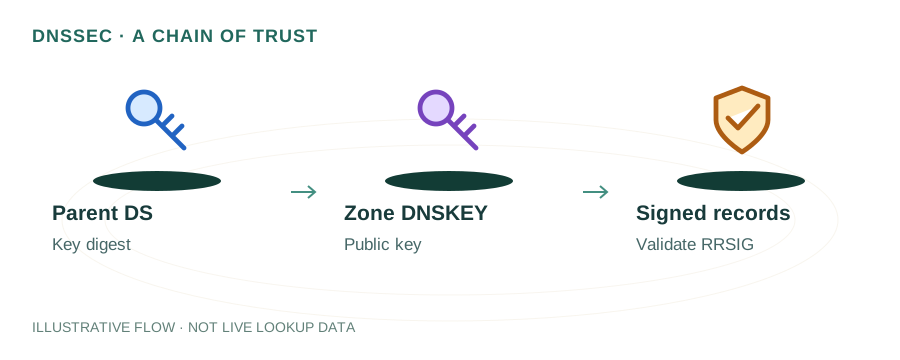
DNSSEC adds cryptographic signatures to DNS responses, preventing cache poisoning and man-in-the-middle attacks. Enable it at both your registrar and DNS provider.
Use a Reputable DNS Provider
Choose providers with Anycast networks, DDoS protection, and high uptime SLAs (e.g., Cloudflare, AWS Route 53, Google Cloud DNS).
Add CAA Records
CAA records specify which Certificate Authorities can issue SSL certificates for your domain, preventing unauthorized certificate issuance.
Minimize Exposed Records
Remove unused DNS records. Dangling CNAME records pointing to deprovisioned services can be hijacked (subdomain takeover).
Email Authentication
Email is the most common attack vector exploiting domain trust. Implement all three standards:
SPF (Sender Policy Framework)
Publish a TXT record listing authorized mail servers. Use -all (hard fail) to reject unauthorized senders.
DKIM (DomainKeys Identified Mail)
Sign outgoing emails with a cryptographic key. Publish the public key as a DNS TXT record so receivers can verify message integrity.
DMARC (Domain-based Message Authentication)
Set a DMARC policy (p=reject) to instruct receivers to reject unauthenticated emails. Configure rua to receive aggregate reports.
SSL/TLS Certificates
- Use TLS 1.2 or 1.3 — disable TLS 1.0 and 1.1
- Enable HSTS (HTTP Strict Transport Security) with a long max-age
- Set up certificate auto-renewal with Let's Encrypt or your provider
- Add CAA DNS records to restrict which CAs can issue certificates
- Monitor certificate transparency logs for unauthorized issuance
Monitoring & Alerts
- Set up domain expiration alerts (at least 90, 30, and 7 days before)
- Monitor DNS record changes with tools like DNSspy or Cloudflare notifications
- Subscribe to Certificate Transparency logs (crt.sh) for your domain
- Review DMARC aggregate reports weekly for unauthorized sending
- Check RBL blacklists periodically with the RBL Checker
Complete Checklist
☐ Registrar lock enabled (clientTransferProhibited)
☐ 2FA enabled on registrar account
☐ WHOIS privacy enabled
☐ Auto-renewal enabled with valid payment
☐ DNSSEC enabled and validated
☐ CAA records published
☐ Unused DNS records removed
☐ SPF record with -all (hard fail)
☐ DKIM signing enabled
☐ DMARC policy set to p=reject
☐ TLS 1.2+ enforced, older versions disabled
☐ HSTS enabled with long max-age
☐ Certificate auto-renewal configured
☐ Domain expiration monitoring active
☐ DNS change monitoring active
☐ DMARC reports reviewed regularly
FAQ
What is a domain registrar lock?
A registrar lock (clientTransferProhibited) prevents unauthorized domain transfers. It must be explicitly removed before a legitimate transfer.
Do I need DNSSEC for my domain?
DNSSEC is strongly recommended for all domains, especially those handling sensitive data or email. It protects against cache poisoning attacks.
How do I check if my domain is secure?
Use the mydnsreport.com DNS Lookup to verify DNS records, DNSSEC status, SPF/DKIM/DMARC, and SSL certificate validity.