
What is an SRV Record? DNS Service Records Explained with Examples
Read SRV priority, weight, port and target fields and verify whether the client application supports service discovery.
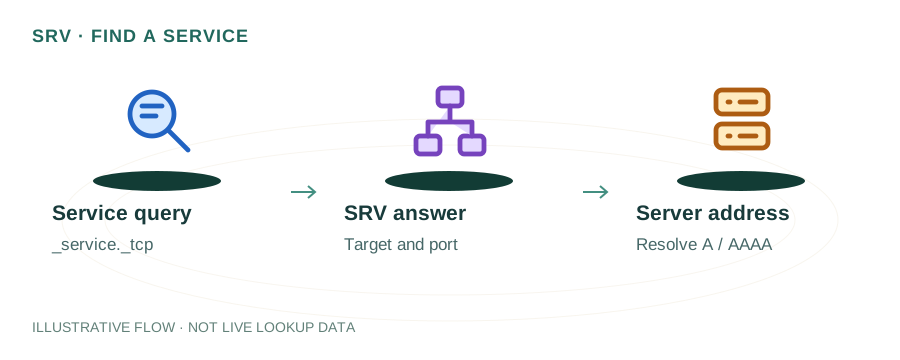
The named scenario below is a worked example for learning, not a verified incident report. Provider settings and outcomes vary.
SRV Record Resolution Flow
App needs service
_service._proto.domain
Lowest priority first
Distribute by weight
Target host + port
Connection established
🎯 Illustrative example: Nisha's Office Uses SRV for Microsoft Teams
Nisha's company sets up Microsoft 365. Teams needs SRV records for auto-discovery of SIP services:
Microsoft requires 2 SRV records
_sip._tls.nisha.com → sipdir.online.lync.com (port 443) and _sipfederationtls._tcp → sipfed.online.lync.com (port 5061).
Understanding the SRV format
_service._protocol.domain TTL IN SRV priority weight port target. Priority=100, Weight=1, Port=443.
Adds SRV records to DNS
Creates both SRV records in her DNS panel with correct priority, weight, and port values.
Teams client auto-discovers services
When users sign in, Teams queries SRV records to find the correct server endpoints automatically.
Common mistake: wrong port
SIP uses 443 (TLS), Federation uses 5061. Swapping ports breaks Teams calling features.
Teams calling and federation work
Users can make calls, share screens, and federate with external organizations.
SRV records enable automatic service discovery — no manual server configuration needed per user.
Missing SRV records = Teams can't auto-discover SIP endpoints. Calling features fail.
What is an SRV Record?
An SRV (Service) record is a type of DNS record defined in RFC 2782 that specifies the hostname and port for a specific service on your domain. Unlike A records (which map a name to an IP) or MX records (which handle email routing), SRV records provide general-purpose service discovery.
SRV records include priority and weight fields, enabling load balancing and failover — similar to how MX records work for email, but for any service.
SRV Record Format
_service._protocol.domain. TTL IN SRV priority weight port target.
_service_sip_xmpp_ldap_protocol_tcp_udppriorityweightporttargetReal-World SRV Record Examples
Microsoft 365 (Teams/Skype)
_sip._tls.example.com.       3600 IN SRV 100 1 443 sipdir.online.lync.com.
_sipfederationtls._tcp.example.com. 3600 IN SRV 100 1 5061 sipfed.online.lync.com.
XMPP / Jabber Chat
_xmpp-client._tcp.example.com. 3600 IN SRV 5 0 5222 xmpp.example.com.
_xmpp-server._tcp.example.com. 3600 IN SRV 5 0 5269 xmpp.example.com.
SIP / VoIP
_sip._udp.example.com. 3600 IN SRV 10 60 5060 sip1.example.com. _sip._udp.example.com. 3600 IN SRV 10 40 5060 sip2.example.com.
Same priority (10), but sip1 gets 60% of traffic and sip2 gets 40% (weight-based distribution).
Minecraft Server
_minecraft._tcp.example.com. 3600 IN SRV 0 5 25565 mc.example.com.
Allows players to connect using example.com instead of mc.example.com:25565.
Priority and Weight: Load Balancing with SRV
SRV records support two-level traffic distribution:
Priority (Failover)
Clients always try the lowest priority number first. If those servers are unavailable, they fall back to higher priority numbers. Think of it as: priority 10 = primary, priority 20 = backup.
Weight (Load Distribution)
Among records with the same priority, weight determines traffic share. A record with weight 70 gets ~70% of traffic vs one with weight 30 getting ~30%. Set weight to 0 for backup-only servers.
Looking Up SRV Records
Using dig
dig SRV _sip._tcp.example.com +short
Using nslookup
nslookup -type=SRV _sip._tcp.example.com
Using PowerShell
Resolve-DnsName -Name _sip._tcp.example.com -Type SRV
mydnsreport.com
Use our DNS Lookup tool to query SRV records for any domain.
Frequently Asked Questions
What is an SRV record used for?
SRV records tell clients where to find specific services — including the server hostname, port, and load balancing preferences. Used for VoIP, chat, directory services, and game servers.
Can an SRV target be an IP address?
No. The SRV target must be a hostname (like sip.example.com), not an IP address. That hostname must have its own A or AAAA record.
How do I disable a service with SRV?
Set the target to . (a single dot) with port 0. This explicitly tells clients the service is not available on this domain.
Related Articles & Tools
CNAME vs A Record
When to use each DNS record type
MX Records Explained
Email routing with priority records
DNS Zone File Explained
Understand DNS zone file syntax
DNS Lookup Tool
Query SRV records for any domain