
MX Records Explained: How Email Routing Works
Read MX priorities, resolve the receiving mail hostname and distinguish DNS routing from SMTP or mailbox delivery failures.
The named scenario below is a worked example for learning, not a verified incident report. Provider settings and outcomes vary.
MX Record Email Routing Flow
Sender composes email
Query recipient's MX
Lowest number first
Try primary server
Try backup if needed
Email reaches mailbox
🎯 Illustrative example: Meera Switches from GoDaddy Email to Gmail
Meera's company is migrating email from GoDaddy to Google Workspace. She changes MX records but forgets to remove old ones:
Adds Google MX records
Adds ASPMX.L.GOOGLE.COM (priority 1) and ALT servers (priority 5, 10).
Forgets to remove GoDaddy MX
Old MX record still exists: secureserver.net at priority 0 (higher priority than Google!).
Emails start splitting
50% of emails go to Google, 50% go to old GoDaddy server — she misses critical client emails.
Diagnoses with MX lookup
DNS lookup shows 2 sets of MX records. GoDaddy's priority 0 beats Google's priority 1.
Removes old MX records
Deletes all GoDaddy MX entries. Only Google MX records remain.
All email flows to Google
Within 1 hour (TTL), all email routes correctly to Google Workspace.
After removing old MX records, 100% of email goes to Google Workspace.
Split MX delivery caused her to miss 3 important client emails over 2 days.
What is an MX Record?
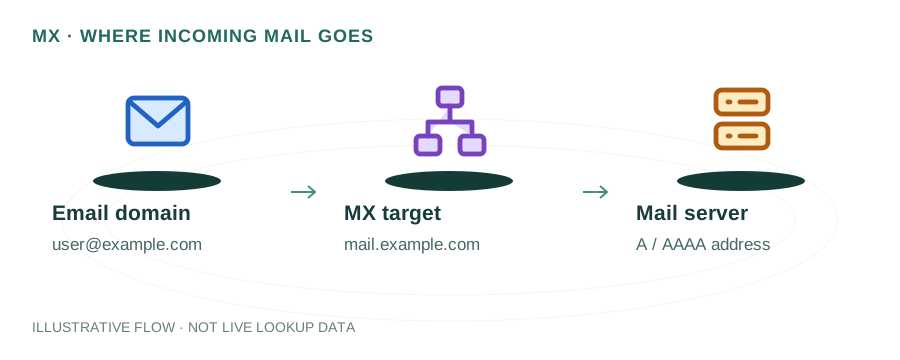
An MX (Mail Exchange) record is a type of DNS record that tells the internet which mail server handles email for your domain. When someone sends an email to user@example.com, the sending mail server queries DNS for the MX records of example.com to find out where to deliver the message.
Unlike A records (which point to a web server) or CNAME records (which create aliases), MX records specifically control email routing. They contain two pieces of information: a priority value and a mail server hostname.
$ dig example.com MX +short
10 mail1.example.com.
20 mail2.example.com.
Understanding MX Priority
The priority number (also called preference) determines the order in which mail servers are tried. Lower numbers = higher priority. If a domain has multiple MX records, the sending server always tries the lowest-numbered one first.
| Priority | Server | Role |
|---|---|---|
| 10 | mail1.example.com | Primary — receives all email first |
| 20 | mail2.example.com | Secondary — used if primary is down |
| 30 | mail3.example.com | Tertiary — last resort backup |
When two MX records share the same priority, sending servers distribute email randomly between them — this is a simple form of load balancing.
MX Records for Common Email Providers
Google Workspace (Gmail)
1 ASPMX.L.GOOGLE.COM.
5 ALT1.ASPMX.L.GOOGLE.COM.
5 ALT2.ASPMX.L.GOOGLE.COM.
10 ALT3.ASPMX.L.GOOGLE.COM.
10 ALT4.ASPMX.L.GOOGLE.COM.
Microsoft 365 (Outlook)
0 yourdomain-com.mail.protection.outlook.com.
Zoho Mail
10 mx.zoho.com.
20 mx2.zoho.com.
50 mx3.zoho.com.
Common MX Record Mistakes
Pointing to an IP address
MX records must point to a hostname, never an IP. Use an A record for the hostname instead.
Missing trailing dot
In many DNS panels, the hostname should end with a period (e.g., mail.example.com.) to indicate it's fully qualified.
CNAME at the MX target
The hostname an MX record points to must have an A record, not a CNAME. RFC 2181 explicitly prohibits this.
Forgetting to remove old MX records
When switching providers, leftover MX records from the old provider can cause split delivery — some emails go to the wrong server.
The Null MX Record
If your domain doesn't send or receive email, you should set a null MX record to explicitly signal this. This is defined in RFC 7505:
example.com. IN MX 0 .
A null MX record prevents spammers from spoofing your domain for email and reduces unnecessary delivery attempts by other servers.
How to Test Your MX Records
Use our free DNS Lookup tool to check your domain's MX records instantly. You can also verify the mail server is responding using our SMTP Tools. For a command-line approach:
$ dig yourdomain.com MX +short
$ nslookup -type=mx yourdomain.com
Frequently Asked Questions
What is an MX record?
An MX (Mail Exchange) record is a DNS record that specifies which mail server is responsible for receiving email on behalf of a domain. When someone sends an email to user@example.com, the sending server looks up the MX records for example.com to find where to deliver the message.
What does MX priority mean?
MX priority (or preference) is a number that determines the order in which mail servers are tried. Lower numbers have higher priority. If the server with priority 10 is unavailable, the sender tries the server with priority 20, and so on.
Can I have multiple MX records?
Yes, having multiple MX records with different priorities provides redundancy. If your primary mail server goes down, email is automatically routed to the backup server with the next lowest priority number.